
Cell Library
The Cell Library is The Voltt's database of more than 500 cells from leading manufacturers, updated continuously to track the highest energy- and power-density cells on the market. It is where most work in The Voltt starts: plot the market, filter it down to the cells that fit your application, compare a shortlist, then send those cells to Simulate or Powermap.
Key Features
Plot the market
The Illustrate view plots every cell by energy density against power density, so the cells at the edge of what is available stand out straight away.
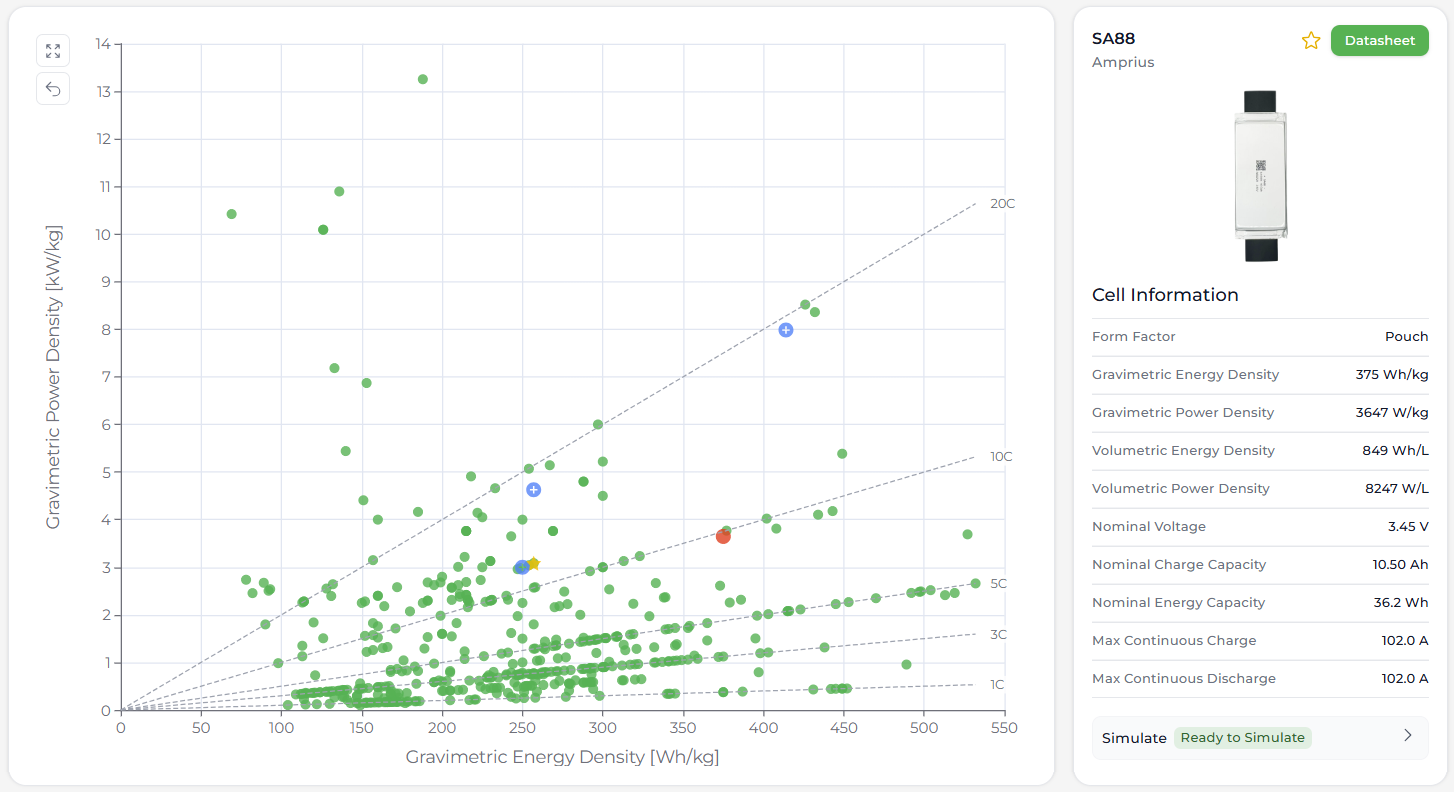
- Switch between gravimetric (per kg) and volumetric (per litre) axes, depending on whether mass or space is your tighter constraint
- Hover over a point to see which cell it is, and click it to open the cell's key figures in the side panel, with a link to the manufacturer datasheet
- Use Plot Settings to adjust the axes, label points with model names and add reference C-rate lines, which show at a glance which cells meet your energy and power requirements
Can't find your cell, or need one modelled? Get in touch and we can usually add it within two weeks.
Filter to your requirements
Narrow the library down with filters for:
- Form factor: cylindrical 18650 or 21700, pouch, prismatic and others
- Manufacturer: Molicel, LG, Samsung, EVE, Amprius and more
- Country of origin: where the manufacturer is headquartered
- Chemistry: cell type (Li-ion, Na-ion) and electrode materials (LFP, Ni-based and others)
- Capacity and energy: nominal charge and energy capacity ranges
- Current: maximum continuous current, as a C-rate
Cells that fall outside your filters fade out on the plot rather than disappearing, so you can still see where your shortlist sits in the wider market.
Find cells you can simulate
Not every cell in the library has a model yet. The Cell Library view lists every cell in a table, with a Simulate column showing which ones do:
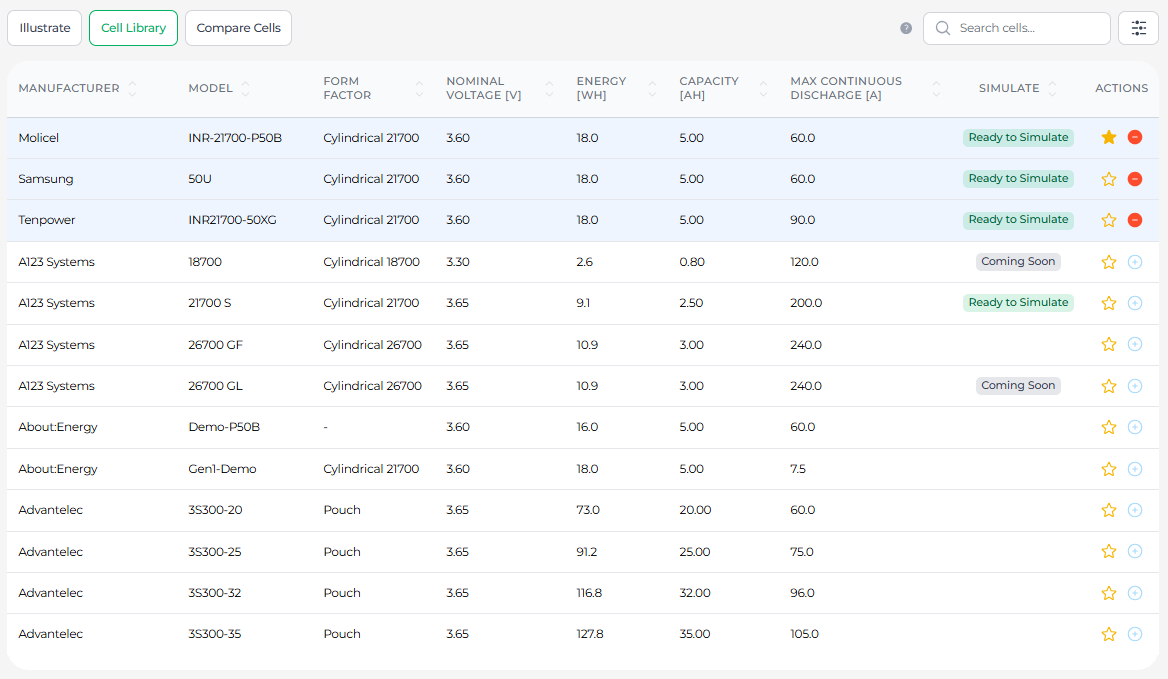
- Ready to Simulate: a model is available now in Simulate and Powermap
- Coming Soon: a model is in development
You can see the same on the plot: turn on the Simulate Cells filter in the Illustrate view, and cells available now show in blue or green, with upcoming cells in grey. Together these act as our modelling roadmap, so you can plan your projects around which cells will be available for simulation when you need them.
Compare a shortlist
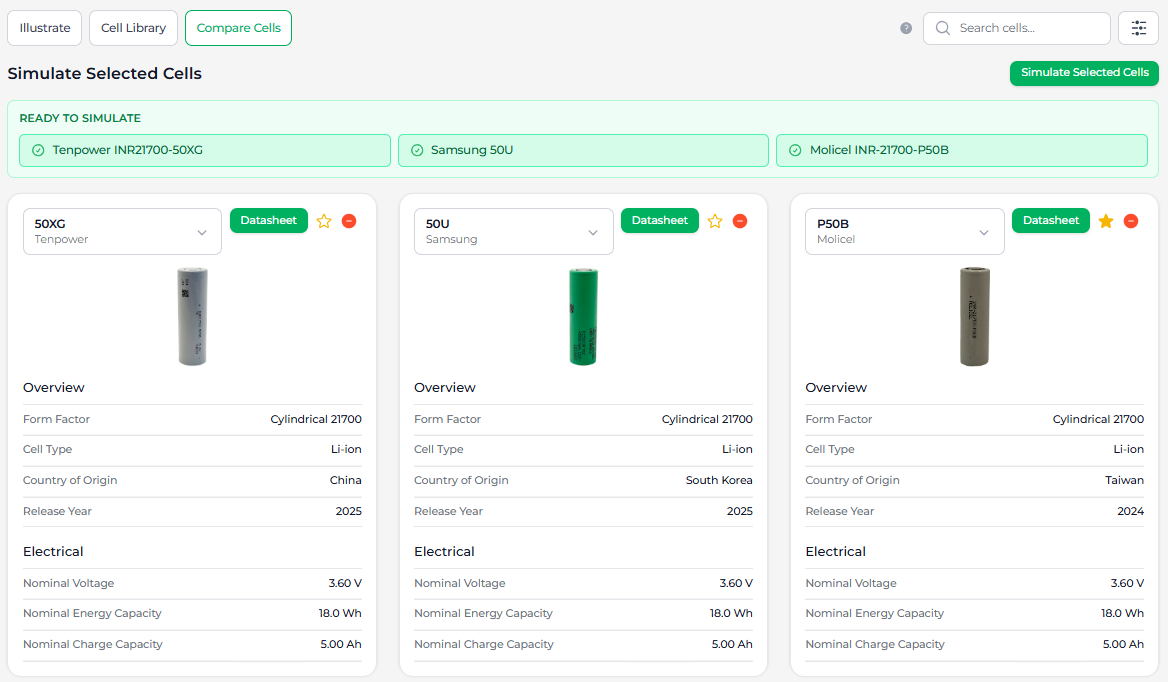
Select up to three cells and open Compare Cells to see their specifications side by side, then send them on to Simulate or Powermap. Star the cells you come back to often to save them as favourites.
Open a cell page
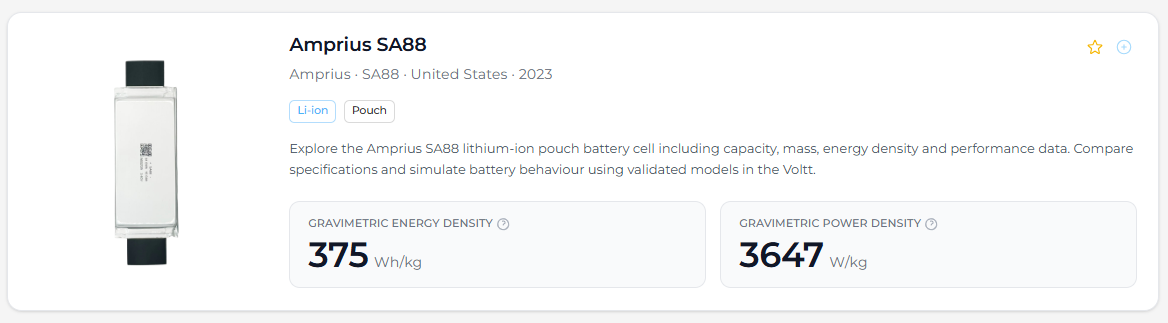
Every cell has its own page, such as the Amprius SA88, with:
- An image, headline energy and power density, and a short description
- The full specification, laid out by the field groups below
- An example simulation showing how the cell performs
- Similar cells: a Ragone chart against comparable cells of the same form factor
- A profile of the manufacturer
Cell Datasheet Fields
Each cell in the library carries the fields below, grouped and labelled as they are on the cell page. The examples are for the Amprius SA88, a pouch cell; "–" marks fields that don't apply to it or aren't shown. This is how the same fields appear on its cell page:
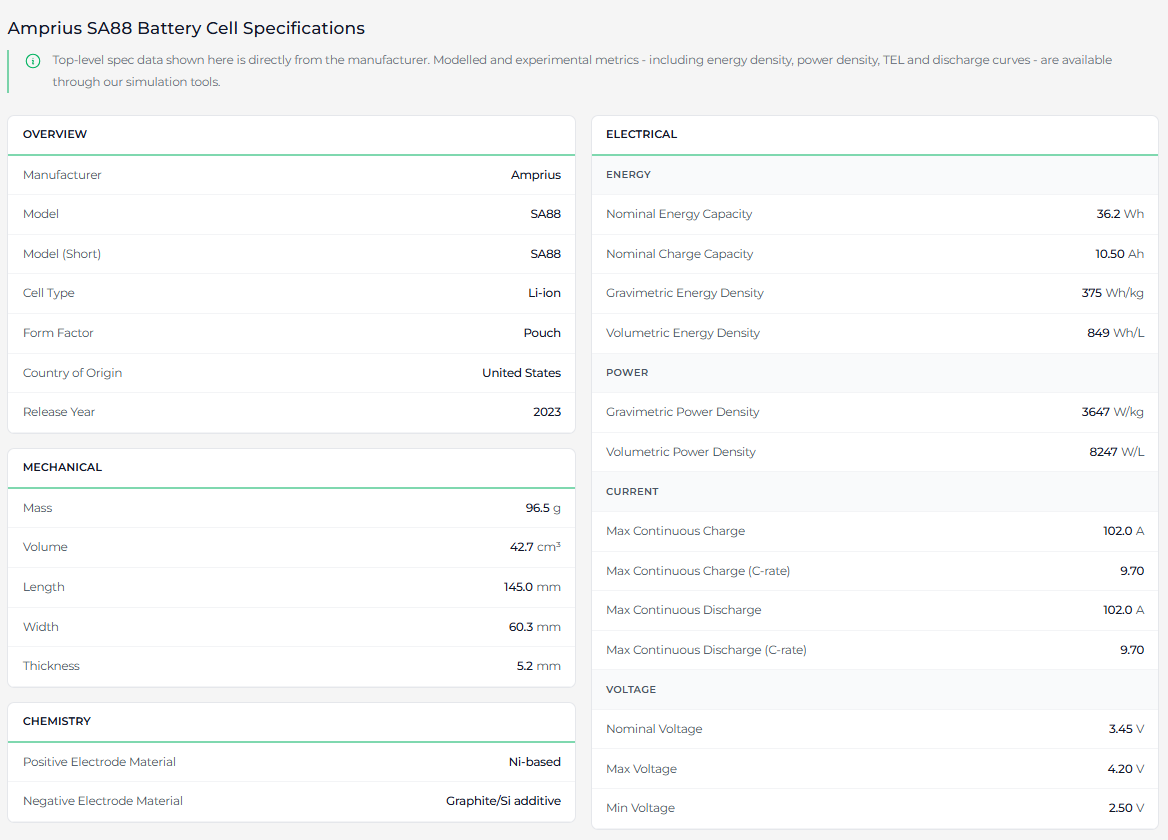
Source says where a value comes from: Manufacturer values are taken from the datasheet, Calculated values are derived from other fields, and some fields use the manufacturer value where a suitable one is published and calculate it otherwise. Where a field is calculated, the formula is given in italics under its definition.
Overview
| Field | Unit | Source | Example | Definition |
|---|---|---|---|---|
| Manufacturer | – | Manufacturer | Amprius | Company that made the cell. |
| Model | – | Manufacturer | SA88 | Full model designation exactly as printed on the manufacturer’s datasheet, including the prefix (e.g. “INR-21700-P45B”). |
| Model (Short) | – | Manufacturer | SA88 | Short model name (e.g. P45B). |
| Cell Type | – | Manufacturer | Li-ion | Technology family, such as Li-ion or Na-ion. |
| Form Factor | – | Manufacturer | Pouch | Physical shape, such as pouch or 21700 cylindrical. |
| Country of Origin | – | Manufacturer | United States | Country where the named manufacturer is headquartered. |
| Release Year | – | Manufacturer | 2023 | Year the cell went into mass production (reached the market), as stated by the manufacturer. |
Electrical
Energy
| Field | Unit | Source | Example | Definition |
|---|---|---|---|---|
| Nominal Energy Capacity | Wh | Manufacturer or calculated | 36.2 | Energy capacity (Wh) corresponding to the nominal charge capacity. This is the manufacturer’s value if it is stated alongside the charge capacity used to define 1C current (whether typical, minimum or other; see Nominal Charge Capacity). If the manufacturer does not state a suitable energy capacity, it is the product of nominal charge capacity and nominal voltage, rounded to 2 d.p., or the manufacturer’s stated minimum energy capacity if that is higher.Nominal energy capacity = nominal charge capacity × nominal voltage |
| Nominal Charge Capacity | Ah | Manufacturer | 10.50 | Charge capacity (Ah) used to define C-rates, such that 1C current equals the ratio of nominal charge capacity to 1 hour. This follows the manufacturer’s convention for 1C current wherever stated, which may not be identically equivalent to a datasheet’s stated minimum, typical, rated, or nominal charge capacity. |
| Gravimetric Energy Density | Wh/kg | Calculated | 375 | Energy capacity per unit mass, calculated as the ratio of nominal energy capacity to cell mass.Gravimetric energy density = nominal energy capacity / cell mass |
| Volumetric Energy Density | Wh/L | Calculated | 849 | Energy capacity per unit volume, calculated as the ratio of nominal energy capacity to cell volume.Volumetric energy density = nominal energy capacity / cell volume |
Power
| Field | Unit | Source | Example | Definition |
|---|---|---|---|---|
| Gravimetric Power Density | W/kg | Calculated | 3647 | Maximum continuous discharge power per unit mass: the product of maximum continuous discharge current and nominal voltage, normalised by cell mass.Gravimetric power density = maximum continuous discharge current × nominal voltage / cell mass |
| Volumetric Power Density | W/L | Calculated | 8247 | Maximum continuous discharge power per unit volume: the product of maximum continuous discharge current and nominal voltage, normalised by cell volume.Volumetric power density = maximum continuous discharge current × nominal voltage / cell volume |
Current
| Field | Unit | Source | Example | Definition |
|---|---|---|---|---|
| Max Continuous Charge | A | Manufacturer | 102.0 | Maximum continuous charge current (A) specified by the manufacturer at 25 °C. Pulse charge currents are not included. |
| Max Continuous Charge (C-rate) | C | Calculated | 9.70 | Maximum continuous charge current expressed as a C-rate, i.e. normalised by nominal charge capacity.Max continuous charge (C-rate) = maximum continuous charge current / nominal charge capacity |
| Max Continuous Discharge | A | Manufacturer | 102.0 | Maximum continuous discharge current (A) specified by the manufacturer at 25 °C. Pulse currents are not included. Where the manufacturer gives more than one continuous value (for example with and without a temperature cut-off), the higher value is used, assuming sufficient cell cooling. |
| Max Continuous Discharge (C-rate) | C | Calculated | 9.70 | Maximum continuous discharge current expressed as a C-rate, i.e. normalised by nominal charge capacity.Max continuous discharge (C-rate) = maximum continuous discharge current / nominal charge capacity |
Voltage
| Field | Unit | Source | Example | Definition |
|---|---|---|---|---|
| Nominal Voltage | V | Manufacturer or calculated | 3.45 | Nominal voltage (V) is the ratio of nominal energy capacity (Wh) to nominal charge capacity (Ah). If the nominal energy capacity is not taken from a manufacturer statement (see Nominal Energy Capacity), nominal voltage is the value the manufacturer states on the datasheet. If the nominal energy capacity is taken from a manufacturer statement, nominal voltage may differ from the manufacturer’s stated value, so that it stays consistent with this ratio.Nominal voltage = nominal energy capacity / nominal charge capacity |
| Max Voltage | V | Manufacturer | 4.20 | Upper (end-of-charge) cut-off voltage (V). |
| Min Voltage | V | Manufacturer | 2.50 | Lower (end-of-discharge) cut-off voltage (V). |
Mechanical
| Field | Unit | Source | Example | Definition |
|---|---|---|---|---|
| Mass | g | Manufacturer | 96.5 | Nominal (typical) cell mass (g) as stated by the manufacturer. Where only a maximum mass is published, that value is used. |
| Volume | cm³ | Calculated | 42.7 | Cell volume (cm³), calculated from the nominal dimensions, assuming an ideal cylinder (cylindrical cells) or ideal cuboid (pouch and prismatic cells). |
| Length | mm | Manufacturer | 145.0 | Nominal cell length (mm) for pouch and prismatic cells, excluding tabs. Length is the longer dimension normal to thickness. Where only a maximum is published, that value is used. |
| Width | mm | Manufacturer | 60.3 | Nominal cell width (mm) for pouch and prismatic cells, excluding tabs. Width is the shorter dimension normal to thickness. Where only a maximum is published, that value is used. |
| Thickness | mm | Manufacturer | 5.2 | Nominal cell thickness (mm) for pouch and prismatic cells. Thickness is the shortest cuboidal dimension. Where the thickness depends on state-of-charge, the value at 100% SOC is used. Where only a maximum is published, that value is used. |
| Height | mm | Manufacturer | – | Nominal cell height (mm) for cylindrical cells. Where only a maximum is published, that value is used. |
| Diameter | mm | Manufacturer | – | Nominal cell diameter (mm) for cylindrical cells. Where only a maximum is published, that value is used. |
Chemistry
| Field | Unit | Source | Example | Definition |
|---|---|---|---|---|
| Positive Electrode Material | – | Manufacturer | Ni-based | Positive electrode (“cathode”) material as stated by the manufacturer or indicated by measured full-cell data (e.g. Ni-based, LFP). “Low Ni”: e.g. NMC111; “Mid Ni”: e.g. NMC532, NMC622; “High Ni”: e.g. NMC811, NCA. Left blank where unknown. |
| Negative Electrode Material | – | Manufacturer | Graphite/Si additive | Negative electrode (“anode”) material as stated by the manufacturer or indicated by measured full-cell data (e.g. graphite, graphite/Si additive). Left blank where unknown. |
Temperature
Temperature limits are held for each cell but aren't shown on the cell page.
| Field | Unit | Source | Example | Definition |
|---|---|---|---|---|
| Min / Max Charge Temperature, Min / Max Discharge Temperature | °C | Manufacturer | – | Lowest and highest temperature allowed for charging and for discharging. |
Common Use Cases
- Early screening: filter by form factor, chemistry and C-rate to get from hundreds of cells to a handful.
- Benchmarking: compare cells from different manufacturers on the same definitions.
- Design trade-offs: use the energy–power plot to see what you give up in power for more energy, and the reverse.
- Next steps: take your shortlist straight into Simulate or Powermap.
Version History
| Version | Release Date | Comments |
|---|---|---|
| 2.0 | 3 Nov 2026 | Field definitions updated to match the cell data audit; new screenshots; page restructured |
| 1.0 | 23 Sep 2025 | First release of documentation |